From the Transporter Listing page, you can click the View icon of a transporter to go to the Transporter page to add, edit or remove transporter details (see Editing transporter details for more information) or handheld users (see Managing handheld users for more information) and/or grant portal access (see Managing transporter portal access for more information.)
To view or make changes to the transporter details, drivers, wash bay users and/or portal access from Transporter Listing page:
•Click View icon of the transporter you wish to view to open the Transporter page.
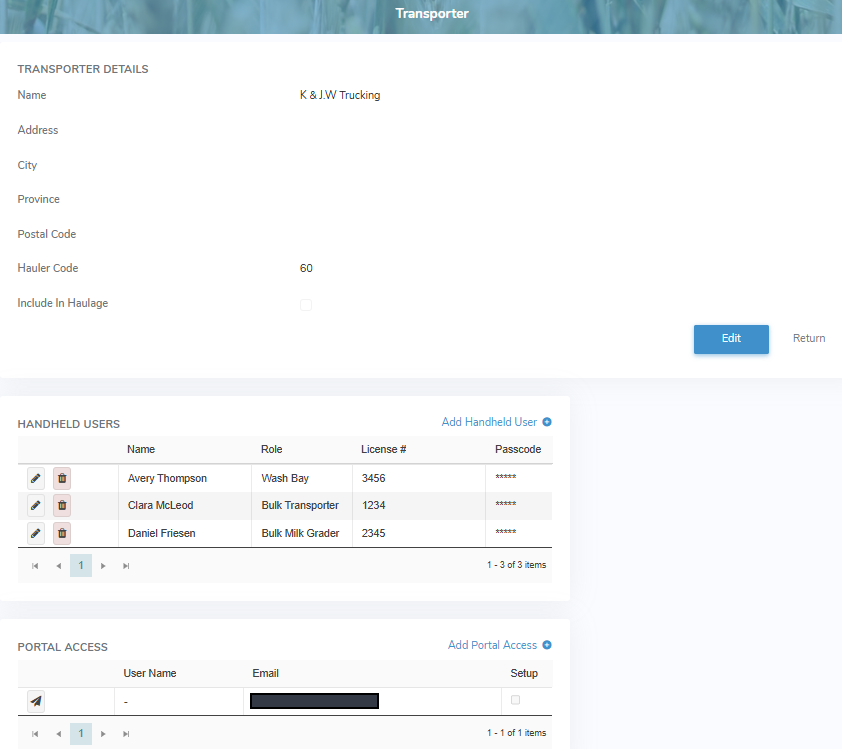
The Transporters page provides:
•View of transporter details, handheld users, and portal access
•Ability to edit transporter details
•Ability to add, edit or delete handheld users, and portal access