In the Trailers screen you can view details or make changes to the shipment trailers.
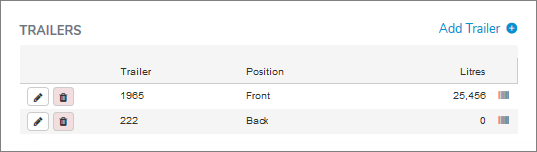
 Tip: To view the sample barcode of a trailer, mouse over the barcode and a dialog with the barcode details displays.
Adding a new trailer
To add a new trailer to the shipment:
1)Click Add Trailer to open the Trailer dialog, and then complete the following: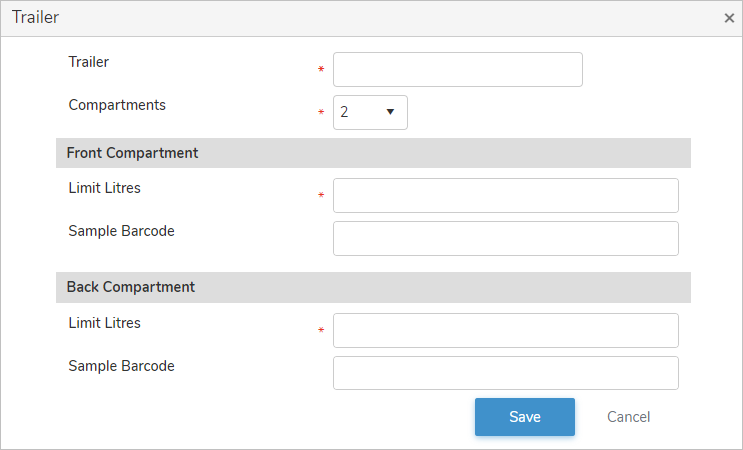
•Trailer*: Type partial or full number of trailer, and then use the scroll bar to move up or down to find and select the desired trailer number.
•Compartments*: Automatically populates with the number of compartment for the trailer.
Front Compartment
•Limit Litres*: Automatically populates with the number of litres.
•Sample Barcode: Type all digits and dashes (e.g., R000-00-0000 or R000[F or B]-00-0000) of the barcode for the compartment sample.
Back Compartment (if more than one compartment)
•Limit Litres*: Automatically populates with the number of litres.
•Sample Barcode: Type all digits and dashes (e.g., R000-00-0000 or R000[F or B]-00-0000) of the barcode for the compartment sample.
2)Click Save to save the trailer and compartment details and return to the Shipment page. The trailer information displays on the Trailers screen.
– or –
Click Cancel to return to the Shipment page without saving the details.
Updating a trailer
To edit or update the trailer and compartment details of the shipment:
1)Click Edit icon to open the Trailer dialog, and then complete the details of the trailer and compartments as necessary (see Adding a new trailer for more information.)
2)Click Save to save the trailer and compartment details and return to the Shipment page. The trailer information displays on the Trailers screen.
Removing a trailer
To remove a trailer from the shipment:
1)Click Remove icon of the number of the trailer you want to remove.
2)Click OK to confirm you want to remove this trailer. The trailer and its detailed information are deleted from the Trailers screen.