The Errors screen displays issues that must be resolved before the quota exchange can be published. These errors often include missing forms or incomplete declarations associated with producer bids. Administrators can review each error, provide notes, and override specific items when valid confirmation has been received (e.g., by phone or email).

Note: Once all errors are cleared or overridden, the exchange can be marked as Publish Ready (see Publishing the quota exchange for more information.) This locks the data and ensures the system automatically publishes the exchange on the scheduled date, generating invoices and notifications without further manual action.
Viewing a quota exchange error
To view a quota exchange error from the Quality Exchange page:
•Click Expand icon of the Error Message you wish to view on the Errors screen to open the Override dialog and view or override the error message as needed.
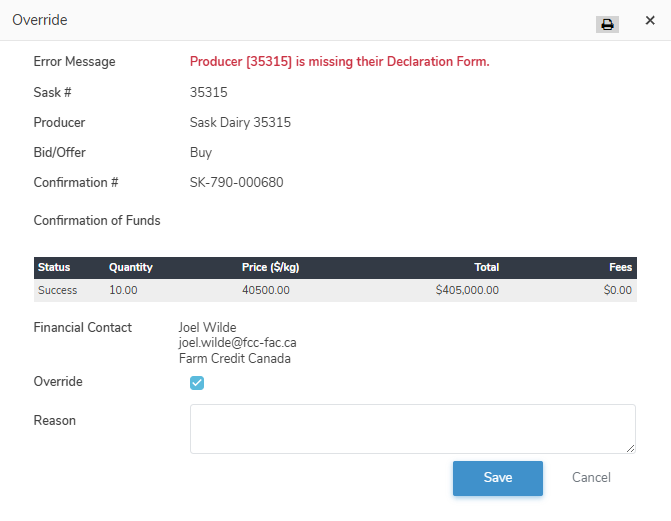
Overriding a quota exchange error
To override a quota exchange error from the Quality Exchange page:
1)Click Expand icon of the Error Message you wish to override on the Errors screen to open the Override dialog.and then complete the following:
•Error Message: Not editable. Displays the error message.
•Sask #: Not editable. Displays the registered number of the producer.
•Producer: Not editable. Displays the producer name of the registered producer ID.
•Bid/Offer: Not editable. Displays the type of transaction.
•Confirmation #: Not editable. Displays the confirmation number of the exchange.
•Financial Contact: Not editable. Displays the financial contact for the exchange.
•Override: Select the check box to override the error message.
•Reason: Type the reason for the override.
2)Click Save to confirm the override. The system then displays the Override By (the user who made the change) and the Reason for the override in the Errors screen.
– or –
Click Cancel to return to the Quality Exchange page without saving the details.