The Quota Exchange page provides an overview of recent SaskMilk quota exchanges and the ability to buy or sell quota by matching supply and demand for quota at a bid or offer price. The exchange effective dates are set on the creation of the quota exchange for quota purchases or sales (see Quota Exchange Parameters for more information.)
Quota Exchange Statuses
The Quota Exchange moves through several system-defined statuses that control available actions and automate key steps in the process. Each status determines what administrators and producers can do as the exchange progresses from setup to publication.
a)Ready: When the exchange process is run, the system checks whether the next exchange period has been created. If not, it automatically creates the next exchange using the parameters and date settings defined in the Quota Exchange Parameters.
b)Open: The exchange automatically moves to Open status on the date specified in the Quota Exchange Parameters. Producers are able to place and/or edit bids.
c)Closed: The exchange automatically changes to Closed based on the date defined in the Quota Exchange Parameters. During this status, producers can no longer place or edit bids. Administrators, however, can still view and manage bids on the exchange.
d)Publish Ready: While the exchange is in Closed status and before the scheduled publication date, the administrator must resolve all errors and then run the Publish Exchange process. Doing so changes the exchange status to Publish Ready, locking it to prevent any further edits or overrides. Once in this status, the exchange will automatically publish on the scheduled date.
e)Published: The exchange moves to Published status once the scheduled publication date has passed and all errors have been resolved. At this stage, a background process automatically publishes the exchange, changes its status to Published, and sends all related invoices and notifications.
Note: If the administrator initiates publishing after the scheduled date, the system bypasses the Publish Ready stage and publishes the exchange immediately, ensuring the process is completed without delay. Exchanges not marked as Publish Ready before the publication date will not be automatically published.
To open the Quota Exchange page:
•Click the Quota arrow on the menu bar and then select Quota Exchange.
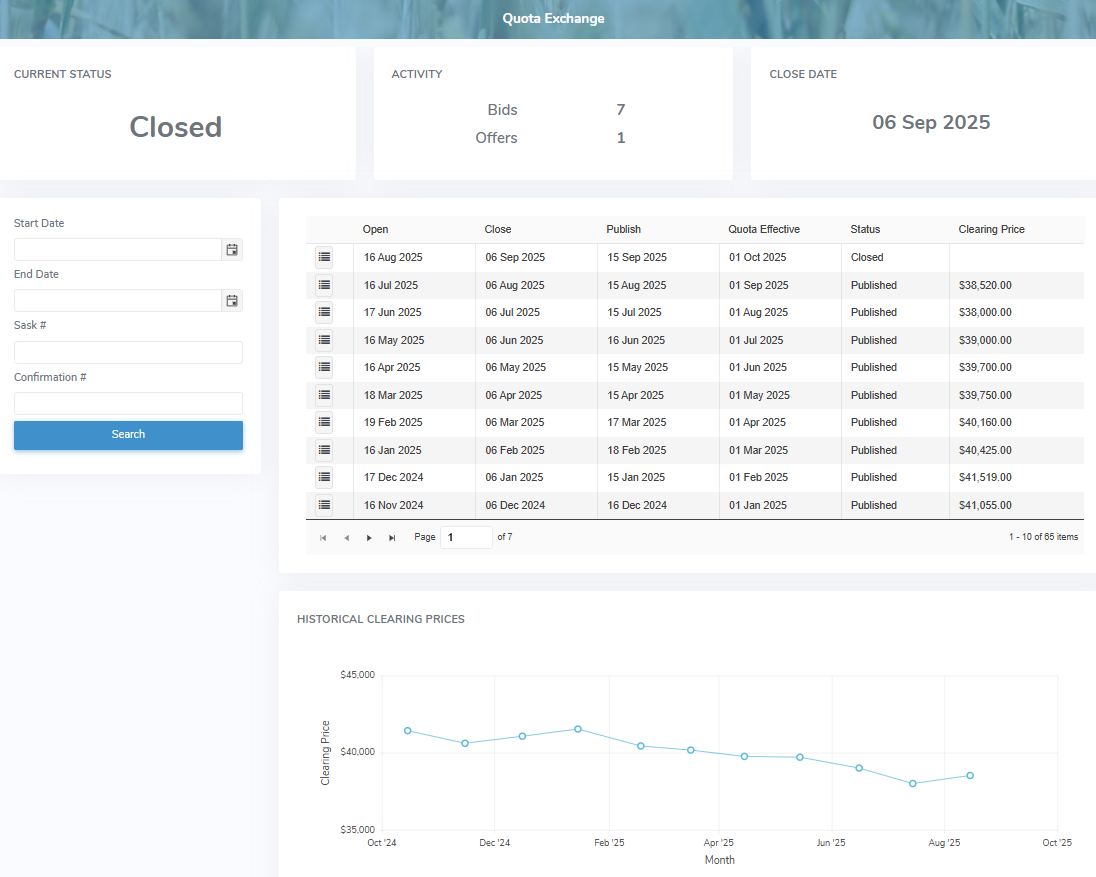
The Quota Exchange page provides:
•Ability to search by start date and/or end date, Sask #, and confirmation number
•View of the current quota exchange status and close date with count down to deadline
•Ability to view, add and/or edit bids or offers for the current exchange
•View of past bids or offers
•View of the monthly quota exchange results and a graphic depiction of the monthly clearing price
•Ability to sort column details in ascending or descending order