The Quota Exchange Parameters page defines the key settings that govern the exchange—opening, closing, and publication dates; payment schedules; and bid/offer limits. It also serves as the official approval record for these parameters, captured with an authorized administrator’s signature. These settings are updated only when significant regulatory or administrative changes occur.
 Note: Only one quota exchange parameter can be active at a time. The active parameter displayed is the one with the most recent date.
To view or make changes to the parameters of the quota exchange from the Manage Settings page:
•Click the Quota Settings arrow from the navigation menu and then select Quota Exchange to open the Quota Exchange Parameters page.
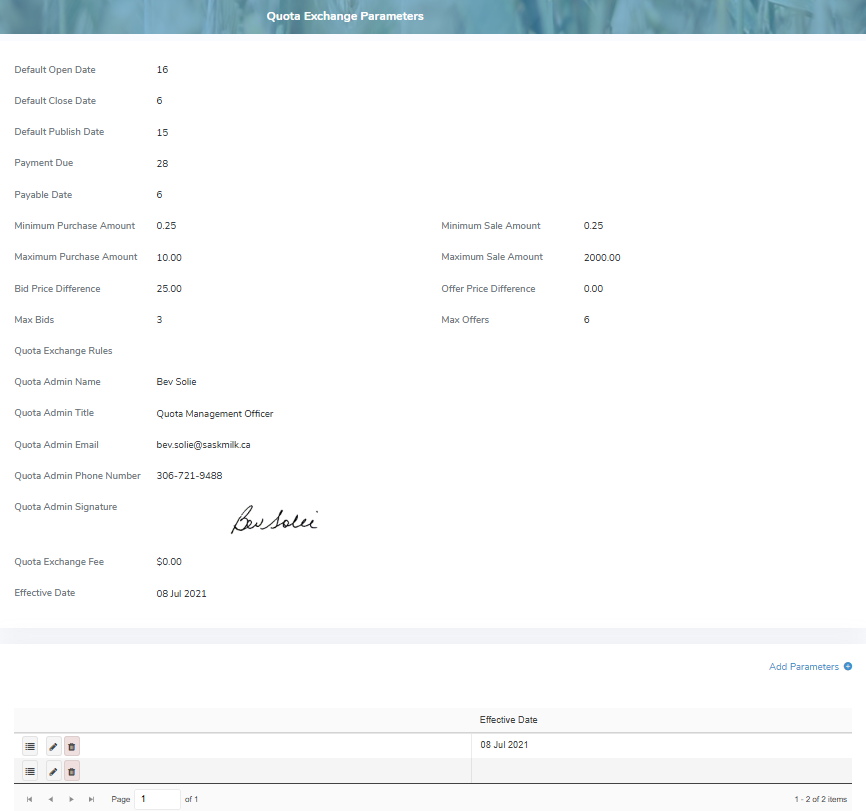
The Quota Exchange Parameters page provides:
•View of the current quota exchange parameters including their effective start dates
•Ability to create parameters
•Ability to view, edit, or delete existing parameters