 Note: Quota exchange dates can only be modified while the exchange is in Ready or Open status. After publication, no further changes are allowed (e.g., price overrides or clearing price adjustments).
To edit or update the details of the quota exchange from the Quota Exchange page:
1)Click Edit to open the Quota Exchange page.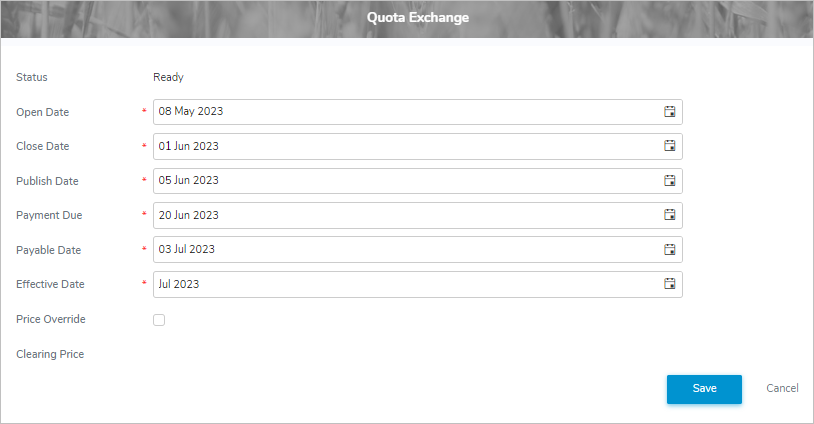
2)Update the following details as needed.
•Status: Not editable. Displays the current status of the quota exchange.
•Open Date*: Type the date or click the Calendar icon to select the date to open the quota exchange.
•Close Date*: Type the date or click the Calendar icon to select the date to close the quota exchange.
•Publish Date*: Type the date or click the Calendar icon to select the date to publish the quota exchange.
•Payment Date*: Type the date or click the Calendar icon to select the date successful bid payments are due for the quota exchange.
•Payable Date*: Type the date or click the Calendar icon to select the date successful offer payments will be made for the quota exchange.
•Effective Date*: Type the date or click the Calendar icon to select the date the quota will be transferred from or to producers on the quota exchange.
•Price Override: Select the check box if to override the quota exchange clearing price.
•Clearing Price: Type the dollar amount for the price override (only available if the Price Override check box is selected).
3)Click Save. The quota exchange details are updated and display on the Quota Exchange Details screen.
– or –
Click Cancel to return to the Quota Exchange page without saving changes.