Adding a new producer lab test
To add a new producer lab test from the Lab Test Search page:
1)Click Add New to open the Lab Test page.
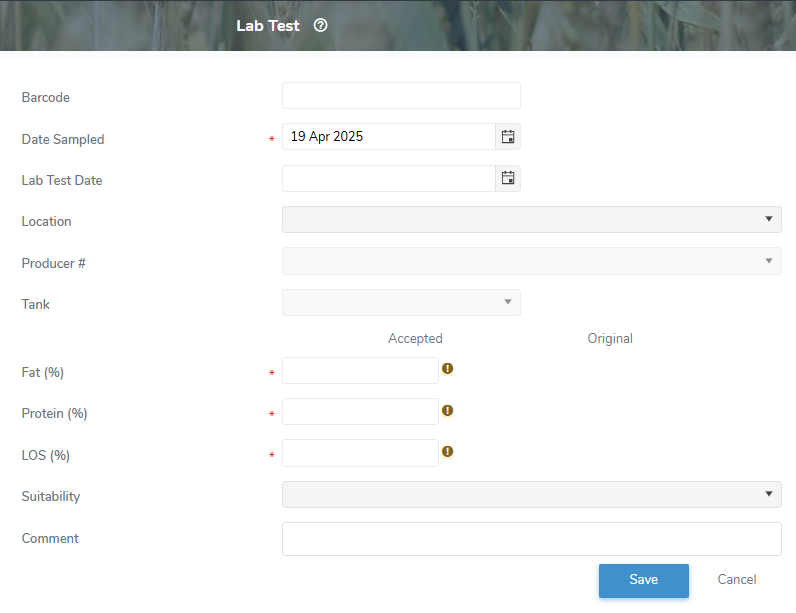
2)Complete the following details:
•Barcode: Type the full barcode of the lab test.
•Date Sampled*: Type the date or click Calendar icon to select the date of the sample.
•Lab Test Date: Type the date or click Calendar icon to select the date of the lab test.
•Location: Click the arrow to display and select the location of the lab test.
•Route Code*: Click the arrow to display and select the route code.
•Tank*: Click the arrow to display and select the tank.
•Fat (%): Type the butter fat measurement percentage value.
•Protien (%): Type the protein content measurement percentage value.
•LOS (%)*: Type the lactose and other solids measurement percentage value.
•Suitability: Click the arrow to display the list of suitabilities, and then use the scroll bar to move up or down the list to find and select a suitability for the lab test if applicable.
 Note: To view the current list of suitability codes go to Admin > Manage Settings > Code Tables and select Lab Test Unsuitable Reason Code.
•Comment: Type a comment for the producer lab test, if applicable.
3)Click Save. The component lab test details display on the Lab Test Search page.
– or –
Click Cancel to return to the Lab Test Search page without saving changes.
Updating a producer lab test
To update or edit the details of a component lab test from the Lab Test Search page:
1)Click Edit icon to open the Lab Test page.
2)Update the details for the producer lab test (see Adding a new producer lab test for more information.)
3)Click Save. The component lab test details display on the Lab Test Search page.
– or –
Click Cancel to return to the Lab Test Search page without saving changes.
Removing a producer lab test
To remove or delete a producer component lab test result from the Lab Test Search page:
1)Click Remove icon of the lab test you wish to remove.
2)Click OK to confirm you want to delete this component lab test. The component lab result and its detailed information are deleted from the Milk Portal and the Lab Test Search page.
Note: Producer component lab tests can only be removed for the current open payment period.