The Lab Test Search page displays the component test results for each tank belonging to the producer. It highlights results that are out of range, include warnings, or have not yet been received. Graphs provide a visual summary of the current data.
Administrators use this page to manage producer component tests and to view or send messages related to the quality of specific component test results.
To open the Lab Test Search page from the Producer Dashboard page:
•Click the Quality arrow on the Navigation bar and then select Lab Tests.
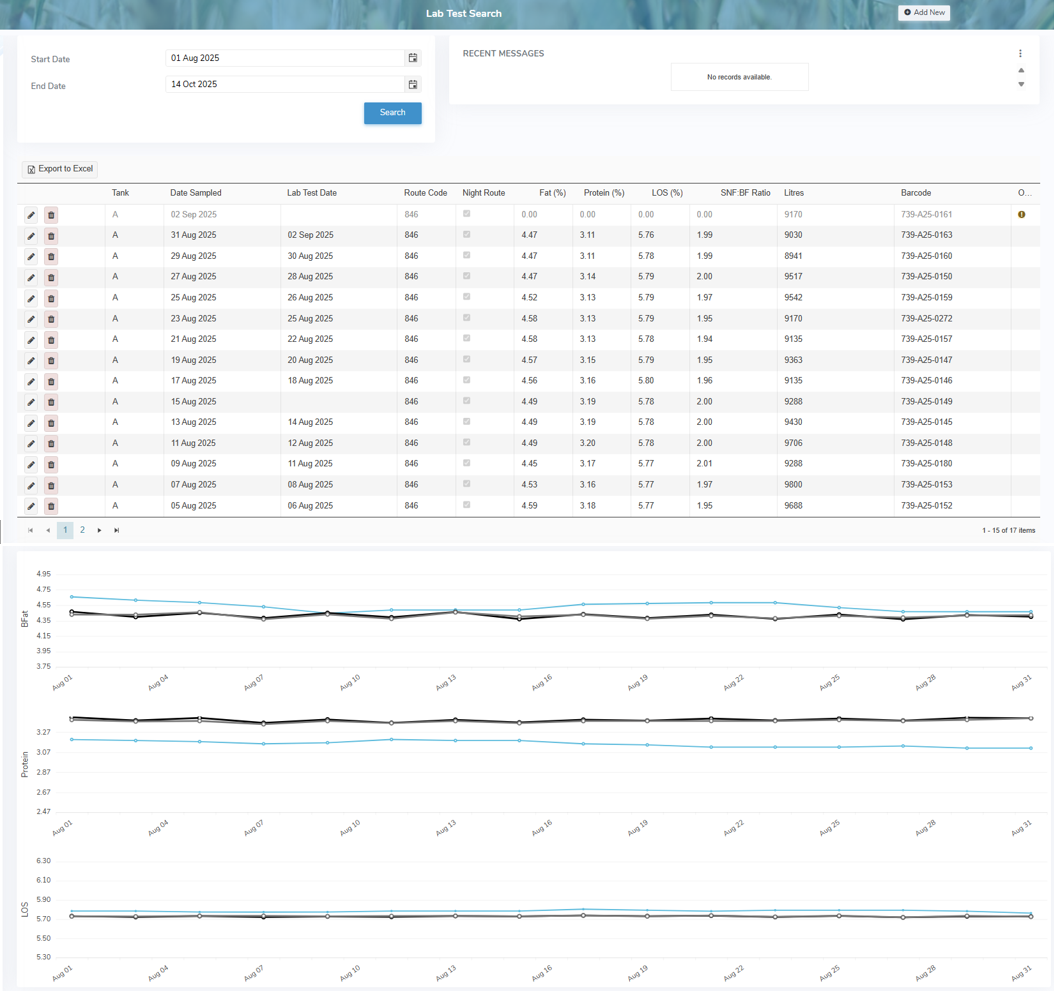
The Lab Test Search page provides:
•Ability to search by start date and/or end date
•Ability to view all recent messages or add new messages
•Ability to add, edit or delete lab test results
•View list of the component tests taken and completed on the tank including information for IBC (x1000) Individual Bacteria Cells (IBC) per litre, Inhibitors (P/N), SCC (x1000) Somatic Cell Count (SCC) per litre, Freezing Point (°H), MUN Milk Urea Nitrogen, CC Coliform count helps to identify milk which may have been exposed to unsanitary conditions., LPC The Laboratory Pasteurization Count (LPC) test determines the number of bacteria in milk., and Suitability as well as an indicator of any penalty range, warning range, or unsuitable result values.
•Ability to sort column details in ascending or descending order
•Ability to view current information in a graphical form
 Tip: On the graphs, the blue line represents the producer, the black line shows the provincial average, and the gray line indicates the provincial mean. Hover over the graph to view specific data points.
•Ability to export lab test results to an Excel format