To view, link contacts, or make changes to the producer contacts from the Manage Producers page:
•Click the View icon of the producer access you wish to view to open the Portal User page.
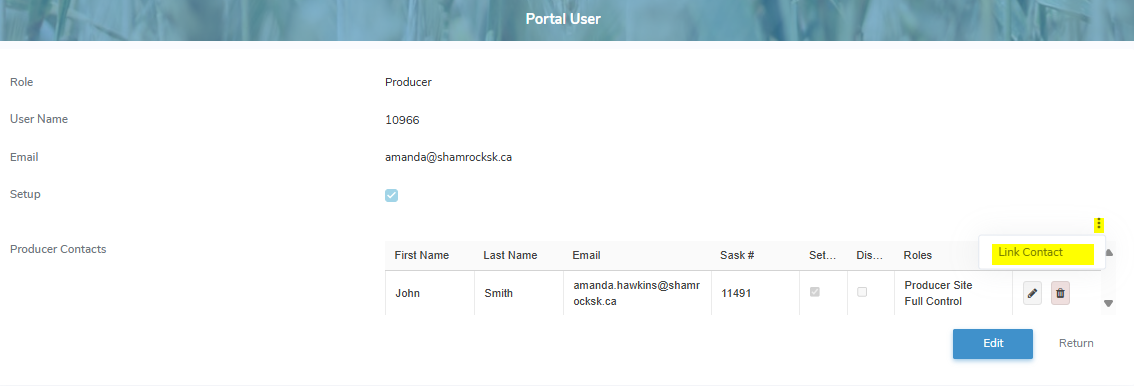
The Portal User page provides:
•View of the producer's user profile
•Ability to link to registered producer numbers associated to their email address
•Ability to add, edit or remove producer contacts
Linking access to producer contacts
Linking access to producer contacts allows users with multiple producer accounts to consolidate them under a single username. Accounts sharing the same email address can be linked so that all associated producer numbers are managed from one login. This streamlines access and enables users to easily switch between linked producer accounts without signing in multiple times.
 Note: When accounts are linked, their records are transferred to the active user account, and the old usernames are removed.
To link access to another producer contact from the Portal User page:
1)Click the vertical ellipsis icon ( ) in the bottom right corner of the producer user profile, and then click Link Contact to display the Link Account dialog.
2)Complete the following:
•Account: Click the arrow to find and select an account (registered Sask #) you wish to link the producer's email address to.
3)Click Link to save the linked producer contact and send an account registration to the email entered. The producer access displays on the Portal User page.
– or –
Click Cancel to return to the Portal User page without saving changes.