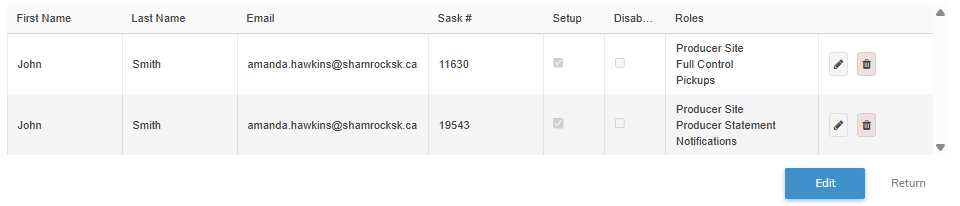
The Producer Contacts screen displays a list of producer contact accounts (registered Sask #) associated with the email address.
Updating a producer portal contact access
To edit or update the details of a producer portal contact access from the Portal User page:
1)Click Edit icon to open the Edit Portal User page to open the Edit Portal User page.
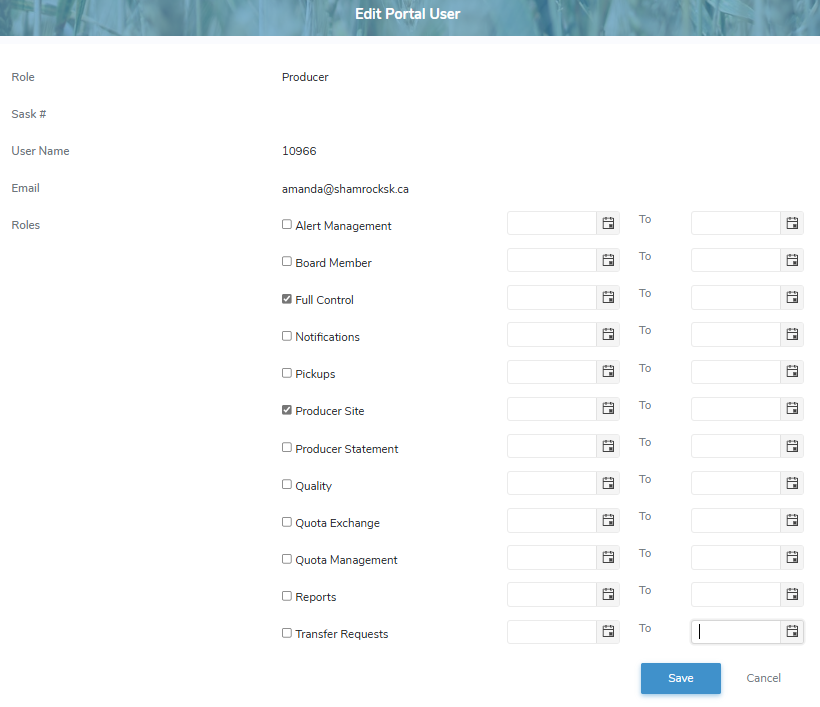
2)Edit or update the details of the producer access as necessary:
•User Role: Not editable. Displays user role.
•Sask #: Not editable. Displays the Sask #.
•User Name: Not editable. Displays the user name.
 Note: The User Name is initially set to the email address when producer access is first created and is later updated to the name specified by the user during their account setup.
•Email: Not editable. Displays the email of the user.
•Roles: Select one or more check box(es) of roles that apply to the permissions for the producer. You may also select a start and/or end date that can be applied to each role.
Note: To see the full list of permission types go to Reference Material - Permission Types.
3)Click Save to save the producer access and send an account registration to the email entered. The producer access displays on the Manage Producers page.
– or –
Click Cancel to return to the Manage Producers page without saving the details.
– or –
Click Resend Registration Email to send an email to the producer access to initiate their account.
Note: Account registration emails are only valid for seven (7) days.
Removing a producer portal contact access
To remove a producer portal contact access from the Portal User page:
1)Click Remove icon of the producer portal contact access you want to remove.
2)Click OK to confirm you want to remove this user. The producer portal contact access and its detailed information are deleted from the Portal User page.