The Link User feature allows you to combine multiple usernames associated with your email address into a single, active account. When you link another username, all producer accounts associated to that username are transferred to your current account (user name shown in the top right corner), and the selected username is removed. This process consolidates your access under one login, while maintaining the individual permissions assigned to each producer account.
Accounts
To move or link another producer to your current account from the Manage Account page:
1)Click Move Accounts from another User to display the Link Account page.
2)Complete the following:
•Account: Click the arrow to find and select the user name associated to your email address that you would like to move or link.
 Note: After selecting a username, additional details are displayed, including the Sask # and the account’s status (set up or disabled).
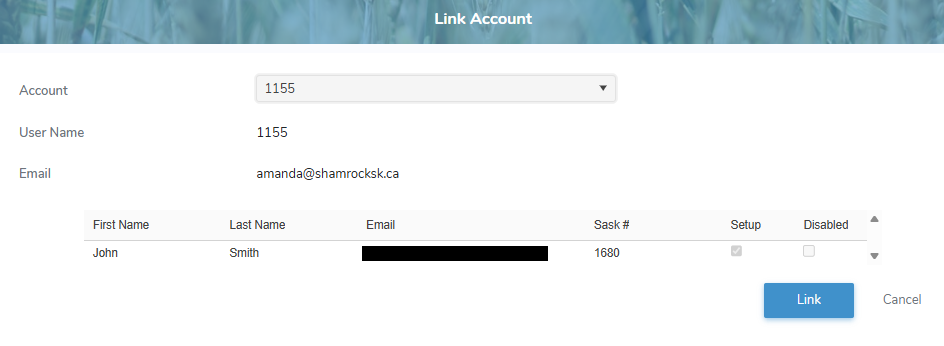
3)Click Link to open the Password dialog and type your password for the selected account to confirm ownership.
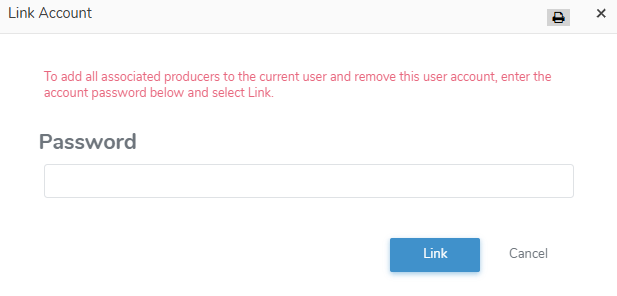
4)Click Link to move or link the producer account to your current account. The selected producer account displays on the Manage Producer Accounts page (see Managing your producer accounts for more information.)
Note: When you update your email address, a confirmation message is sent to the new email address. After you verify it, your contact information—and any producer accounts linked to that email—are updated automatically.
– or –
Click Cancel to return to the Link Account page without saving changes.