The Contacts page displays a list of individuals associated with the producer who have been granted access to the producer’s information in the Producer Portal.
 Note: Primary users can edit or remove contacts directly from the Contacts page. Removing a contact also deletes the associated producer account. Primary users cannot remove their own permissions; if their access needs to be changed (e.g., after selling or transferring ownership), they must contact SaskMilk for assistance.
To open the Contacts page from the Producer Dashboard:
•Click the Contact arrow on the Navigation menu and then select Contacts.
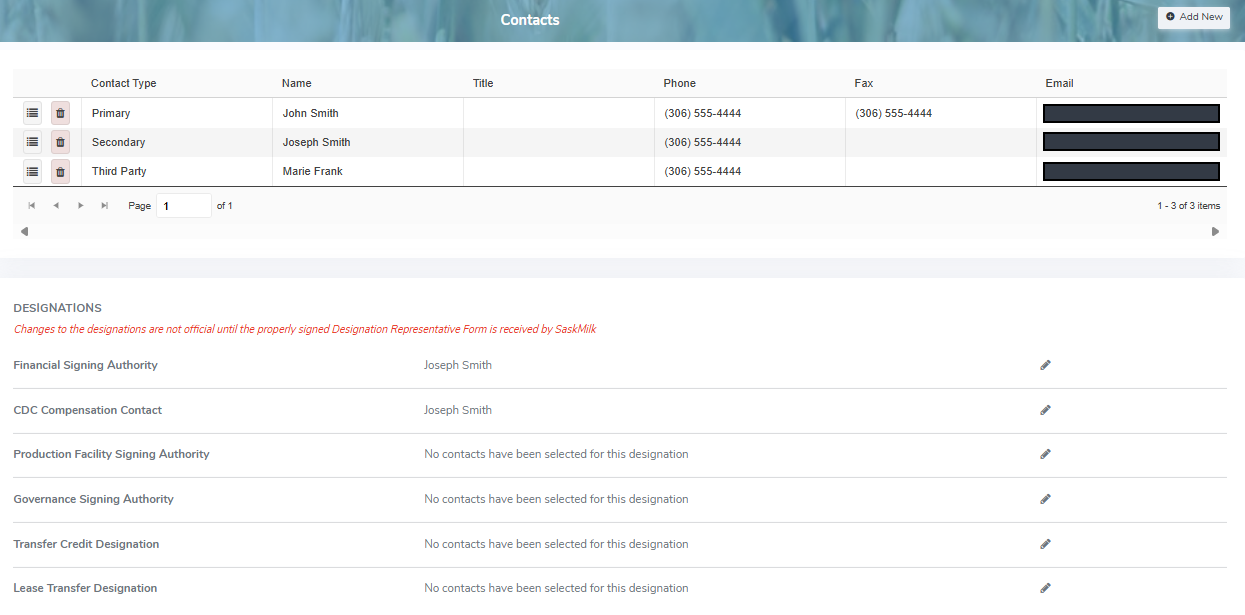
The Contacts page provides:
•View of producer contacts and designations of authority
•Ability to add, edit or delete contacts and assign portal access
•Ability to designate or edit contacts to specific roles such as:
oFinancial signing authority
oCDC compensation contact
oProduction facility signing authority
oGovernance signing authority
oTransfer credit designation (required for the Credit Exchange)
oLease transfer designation