The EFT Settings page displays the current EFT payment setting information of the SaskMilk. The EFT (Electronic Funds Transfer) settings are used when creating an EFT file within the Milk Payment System for the month end, advance, quota exchange, and credit exchange processes.
To view or edit the details of the EFT settings from the Manage Settings page:
1)Click the Payment Settings arrow on the navigation menu, and then select EFT Settings.
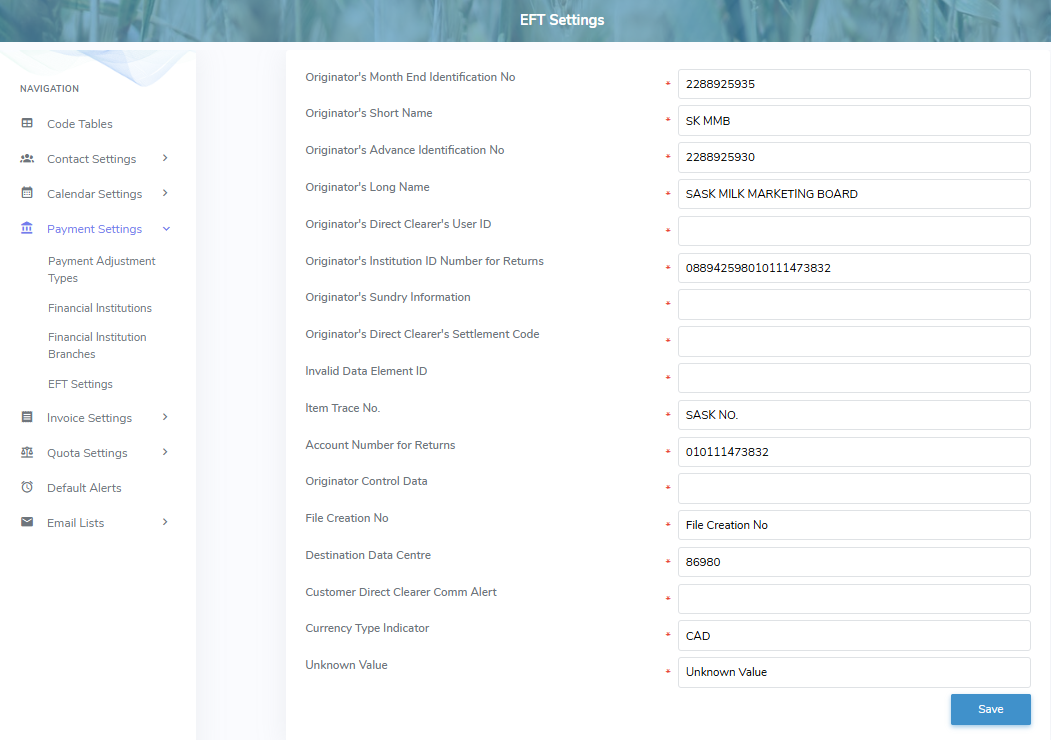
2)To edit or update the EFT settings, complete the following details:
•Originator's Month End Identification No: Type the month end identification number of the originator.
•Originator's Short Name: Type the short name. This name is included with every outgoing payment and may appear as the transaction description on the Payee/Payor's bank statement.
•Originator's Advance Identification No: Type the advance identification number of the originator.
•Originator's Long Name: Type the long name. This name is included with every outgoing payment and may appear as the transaction description on the Payee/Payor's bank statement.
•Originator's Direct Clearer's User ID: Type the direct clearer's user ID.
•Originator's Institution ID Number for Returns: Type the institution ID number for returns.
•Originator's Sundry Information: Type the sundry information of the originator.
•Originator's Direct Clearer's Settlement Code: Type the direct clearer's settlement code.
•Invalid Data Element ID: Type the invalid data element ID.
•Item Trace No.: Type the item trace number.
•Account Number for Returns: Type the account number. Identifies the account which returned payments will be charged back to.
•Originator Control Data: Type the originator control data.
•File Creation No: Type the file creation number.
•Destination Data Centre: Type the destination data centre.
•Customer Direct Clearer Comm Alert: Type the customer direct clearer comm alert.
•Currency Type Indicator: Type the currency that the originator supports (i.e. Canadian Dollar (CAD) or US Dollar (USD) payments).
•Producer Payment Transaction Type: Type the producer payment transaction type.
3)Click Save. The EFT information displays on the EFT Settings page.