To add a new producer from the Producers page:
1)Click Add New to open the Add New Producer page. 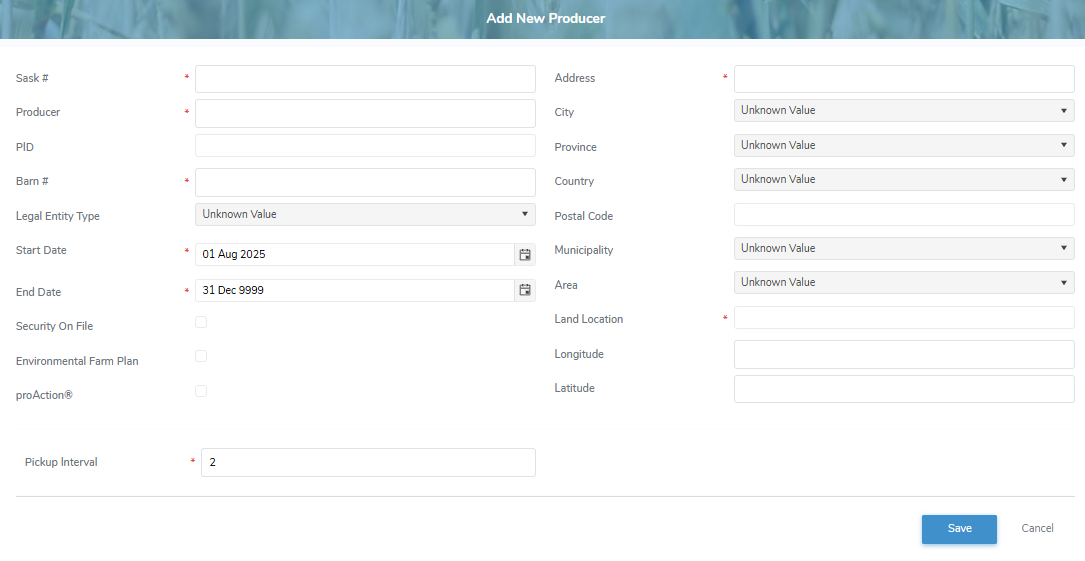
2)Complete the following details:
•Sask #*: Type the SaskMilk registration number assigned to the producer.
•Producer*: Type full legal company name of the producer.
•PID: Type the unique Premise Identification PID is an unique code assigned to a specific piece of agricultural land (the premises) where animals are kept, raised, or assembled. number assigned to the producer.
•Barn #*: Type full barn number assigned to the producer.
•Legal Entity*: Type first letter of the type of legal entity or click the arrow to display list of the types of legal entities, and then select the one which represents the producer.
•Start Date*: Type the start date or click Calendar icon to select the active date of the producer.
•End Date*: Type the end date or click Calendar icon to select the inactive date of the producer.
•Pickup Interval: Type the number of days between pickups for the producer.
__________________________________________
•Security On File: Select the check box if the security of the producer is on file.
•Environmental Farm Plan: Select the check box if the producer has an environmental farm plan.
•proAction®: Select the check box if the producer's PID number has been validated for the national on-farm quality assurance and sustainability program.
__________________________________________
•Letter of Direction on File: Select the check box if a letter of direction for the producer is on file.
•Lender: Type the name of the lender for the producer, if applicable.
•Comments: Type a note or comment regarding the producer. The comment is internal to the SaskMilk portal.
Mailing Address
•Address*: Type the mailing address of the producer.
•City: Type first letter of the city or click the arrow to display list of cities, and then select the city.
•Province: Type first letter of the province or click the arrow to display list of provinces, and then select the province.
•Country: Type first letter of the country or click the arrow to display list of the counties, and then select the one where the producer resides.
•Postal Code*: Type full postal code of the producer.
•Municipality: Type the number of the municipality or click the arrow to display list of municipalities, and then select the municipality of the producer.
•Area: Type first letter or click the arrow to display list of areas, and then select the area that the producer's location belongs to.
•Land Location: Type the legal land description of the producer (e.g., SW 24-38-20-W5, representing the Quarter Section / Township / Range / Meridian.)
•Longitude: Type full longitude (e.g., - 63.17636)
•Latitude: Type full latitude (e.g., 46.18445)
2)Click Save. A message displays you have successfully saved a new producer and the producer details display on the Producers page.
– or –
Click Cancel to return to the Producers page without saving changes.