 Note: When a penalty is reverted, it is marked as such in the system and no longer counts toward the producer’s total number of violations. This adjustment lowers the producer’s cumulative penalty count, which can reduce future penalty rates and associated charges.
To revert a progressive penalty result of a producer from the Progressive Penalty Search page:
1)Click on the row of the progressive penalty result you want to revert. The row of the selected result will be highlighted.
2)Click the vertical ellipsis icon ( ) in the top right corner of the Results screen, and then click Revert Penalty to open the Revert Penalty dialog.
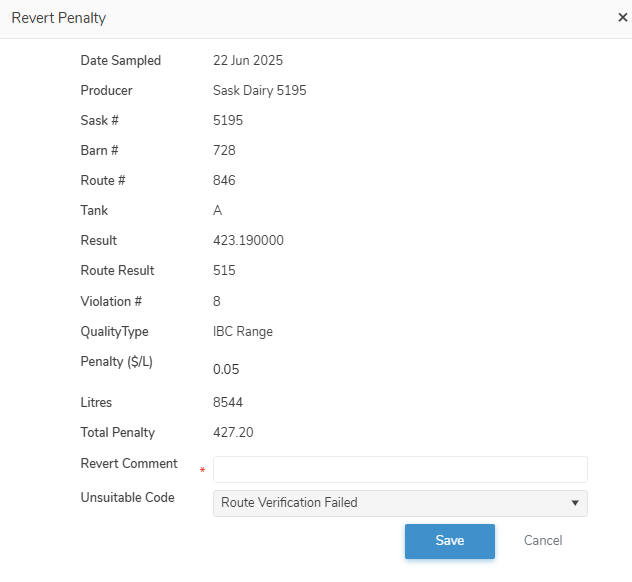
3)Complete the following details:
•Revert Comment*: Type a reason for reverting the progressive penalty result of a producer.
•Unsuitable Code: Click the arrow, and then use the scroll bar to move up or down to find and select the desired unsuitable code for the lab sample.
Note: To view the current list of suitability codes go to Admin > Manage Settings > Code Tables and select Lab Test Unsuitable Reason Code.
4)Click Save to confirm that you are ready to revert this progressive penalty result. The progressive penalty results is highlighted and revert comment displays in the list.
– or –
Click Cancel to return to the Progressive Penalty Search page without saving changes.
Reversing a reverted producer progress penalty result
To undo or reverse a progressive penalty result of a producer from the Progressive Penalty Search page:
1)Click Undo icon of the progressive penalty result you wish to reverse.
2)Click OK to confirm you want to undo this reversion. The progressive penalty result comment is removed from the progressive penalty result on the Progressive Penalty Search page.