The Prior Identity page provides the ability to identify the effective start date of the new entity and to copy information from the Sask # already located in the system.
 Warning: After a new prior identity has been added, it cannot be deleted. The new prior identity takes effect immediately on the start date and the old prior identity is locked so no further changes can be made. However, the information of the old prior identity is still viewable.
To add a new prior identity from the Prior Identity page:
1)Click Add New to open the Prior Identity page.
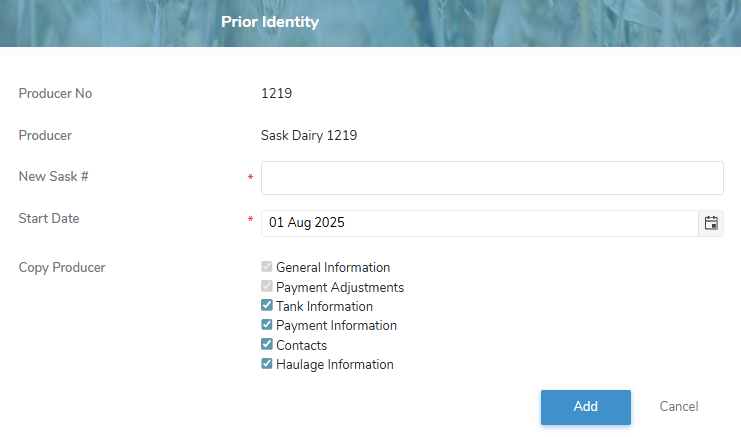
2)Complete the following details:
•Producer No: Not editable. Displays the active registered producer ID.
•Producer: Not editable. Displays the producer name of the registered producer ID.
•New Sask #: Type full SaskMilk registered number of the new producer.
•Start Date: Type the start date or click Calendar icon to select start date for the new identity which may not exceed two months into the future.
•Copy Producer: Select the check box of the information you want to be copied to the new identity.
 Note: The General Information and Payment Adjustments of the active identity must be copied to the new identity as this information forms the foundation for the new identity.
3)Click Add to open the Producer Details page of the new identity. A message displays you have successfully created a new producer and the details display on the Prior Identity page.
– or –
Click Cancel to return to the Prior Identity page without saving changes.
Note: On the Producer Details page of the new identity you can edit and update the producer details and status information of the new producer (see Adding new producer and Managing producer status for more information.)
4)On the Producer Details page of the new identity you can edit and update the producer details and status information of the new producer (see Adding new producer and Managing producer status for more information.)