To view, edit, add, update or delete a penalty range grouping for a quality type:
•Click Edit icon beside the range type (e.g., Butterfat Range, Lactose Range, etc.) to open the Quality Range Maintenance page.
 Note: You must create a new penalty range grouping with a start date (see Adding a new penalty range grouping for more information) before you can add individual penalty ranges (see Adding a new individual penalty range for more information.)
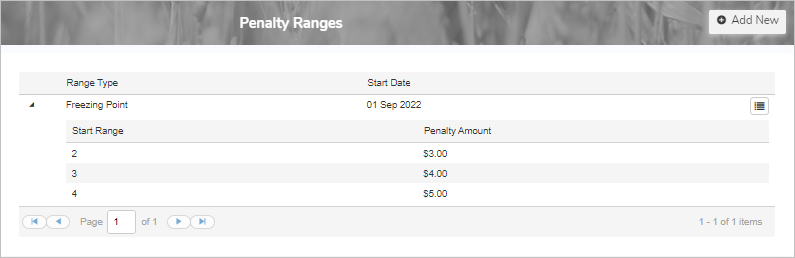
Viewing a penalty range grouping
To view penalty range grouping for a selected quality range type from the Quality Range Maintenance page:
1)Click Edit icon of the Range Type you wish to view.
2)Click View to open the Quality Penalty Range page. From there, you can update the details of the penalty range grouping and add, edit, or remove individual penalty ranges.
Adding a new penalty range grouping
To add a new penalty range group for a selected quality range type from the Quality Range Maintenance page:
1)Click Edit icon of the Range Type you wish to add a new penalty range grouping to.
2)Click Add New to open the New Quality Penalty Range page, and then complete the following: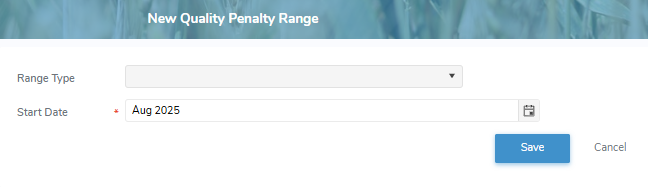
•Range Type*: Type the first letter or click the arrow to display list of quality range types, and then use the scroll bar to move up or down the list to find and select a quality range type.
•Start Date*: Type the date or click the Calendar icon to select the lab date.
3)Click Save to save the the penalty range group. The system will open the Quality Penalty Range page where you can update the details of the penalty range grouping and add, edit, or remove individual penalty ranges.
– or –
Click Cancel to return to the Quality Range Maintenance page without saving the details.
Updating a penalty range grouping
To edit or update a penalty range grouping for a selected quality range type from the Quality Range Maintenance page:
1)Click Edit for the Range Type you wish to update.
2)Click Edit for the Start Date of the penalty range grouping you wish to update to open the Update Quality Penalty Range page.
3)Edit or update the start date of the penalty range grouping as necessary (see Adding a new penalty range grouping for more information.)
4)Click Save to save the penalty range grouping. The system will open the Quality Penalty Range page where you can update the details of the penalty range grouping and add, edit, or remove individual penalty ranges.
– or –
Click Cancel to return to the Quality Range Maintenance page without saving the details.
Removing a penalty range grouping
To remove a penalty range grouping for a selected quality range type from the Quality Range Maintenance page:
1)Click Edit for the Range Type you wish to remove.
2)Click Remove icon of the quality range grouping you want to remove.
3)Click OK to confirm you want to remove this item. The quality range grouping and its detailed information are deleted from the Quality Range Maintenance page for the selected quality range type.