To add a new quota transfer from the Quota Transfers page:
1)Click Add New to open the Add Quota Transfer page.
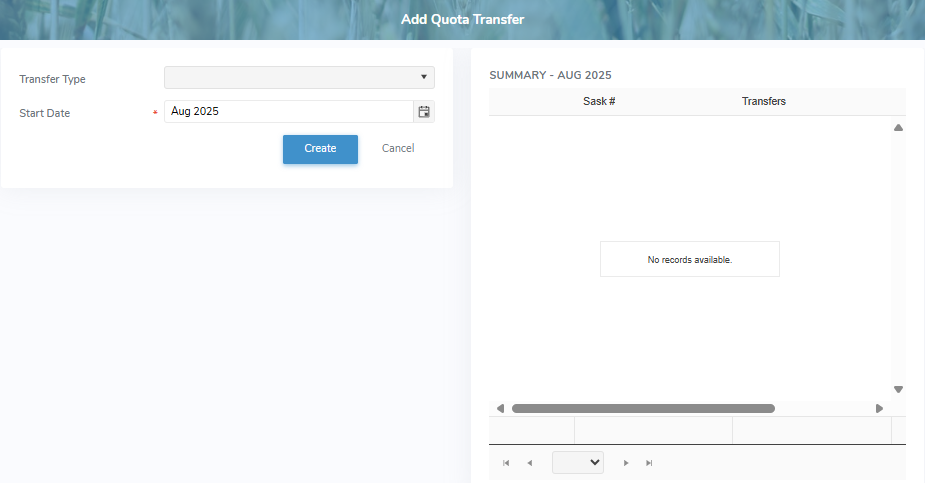
 Note: A summary table displays a view of the individual producer transactions for a selected transfer type and month. Click the View icon to open the Producer Detail dialog and view the individual transactions for the producer you have selected.
2)Complete the following details:
•Transfer Type: Type the first letter or click the arrow to display a list of transfer types, then use the scroll bar to move up or down to find and select a transfer type.
•Start Date: Type the month and year or click the Calendar icon to select the start date of the new transfer.
If Transfer Type = Lease:
•End Date: Type the month and year or click the Calendar icon to select the end date of the new quota transfer.
Note: End date for lease transfer must be within the current dairy year.
•Apply Quota Increase: Select the check box if you want to apply quota increases for the month.
If Transfer Type = Permanent Quota Decrease or Permanent Quota Increase:
•All Producers / Selected Producers: Select the check box that applies to the new quota transfer type.
•Amount: Type the percent or kilograms of BFat (Kgs).
•Applied Quota Types: Select the type of quota to be applied (i.e., Assessable, Credit, Daily Quota, Lease Quota, New Entrant Quota, Swap, Temporary, or Used).
3)Click Create. A message displays you have successfully added a new transfer and returns to the Quota Transfer page for the specific quota transfer.
Note: A unique quick reference number is automatically created for the new transfer.
– or –
Click Cancel to return to the Quota Transfers page without saving changes.
4)Continue editing, adding a new transfer, or enter details for the transfer.