The Quota Management Worksheet gives the producer the ability to set scenarios and see the impact to their milk production environment.
 Note: A projection may only be added to a future or current open period before Pickups and Components have been closed (see Month End Admin for more information).
To add a projection from the Quota Management Worksheet page:
1)Click Add Projection (bottom right corner) to open the Quota Projection dialog.
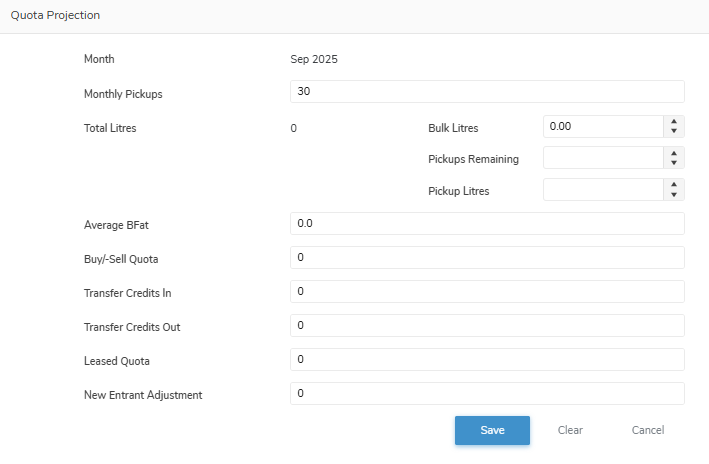
2)Complete the following details:
•Month: Not editable. Automatically populates with the next month available when adding a new projection.
•Monthly Pickups: Automatically populates with the total number of possible pickup days in the month selected.
•Total Litres: Automatically calculates total litres (Bulk Litres + (Pickups Remaining x Pickup Litres)) based on:
oBulk Litres: Type the total number of additional bulk litres you project will be shipped for the rest of the month.
Note: If blank then the Total Litres calculation is based on the total number of remaining pickups and the total average number of litres for the month.
oPickups Remaining: Type the projected number of remaining pickups for the month after the total bulk litres.
oPickup Litres: Type the projected total average number of litres for the remaining pickups.
•Average BFat: Type the projected average butter fat content (Kgs/litre).
•Buy/-Sell Quota: Type the projected number of units (BFat Kgs/day) purchased (positive number) or number of units sold (negative number).
•Transfer Credits In: Type the projected total number of credits (BFat Kgs) to be transferred in (purchased).
•Transfer Credits Out: Type the projected total number of credits (BFat Kgs) to be transferred out (sold).
•Leased Quota: Type the projected total number of quota (BFat Kgs/day) to be leased.
•New Entrant Adjustment: Type the projected number of new entrant adjustments (BFat Kgs/day) purchased (positive number) or number of units sold (negative number).
Note: New entrant producers receive a temporary quota allotment to help them start production. This allotment is limited by SaskMilk’s Dairy Entrant Assistance Program (DEAP) Policy. Producers cannot exceed the maximum allowed quota; any amount over the limit will be reduced according to the policy.
3)Click Save. The table will update and display the new projection.
– or –
Click Clear to clear all the content of the Quota Projection dialog to re-enter your information.
– or –
Click Cancel to return to the Quota Management Worksheet page without saving changes.