Adding a new quota type
 Note: Any new quota types must be coordinated with the SaskMilk developers, as they require system coding to function properly. The existing fields are primarily for historical reference.
To add a new quota type from the Quota Types page: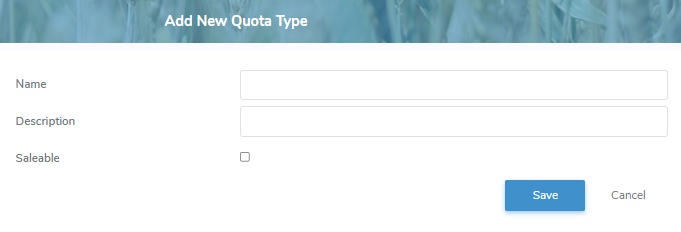
1)Click Add New to open the Add New Quota Type page.
2)Complete the following details:
•Name: Type the name of the quota type.
•Description: Type a brief description.
•Saleable: Select the check box if the producer can sell the quota type.
3)Click Save to save the quota type and return to the Quota Types page. The quota type will appear on the list.
– or –
Click Cancel to return to the Quota Types page without saving the details.
Updating a quota type
To edit or update the details of a quota type from the Quota Types page:
1)Click Edit icon to open the Update Quota Types page.
2)Edit or update the details of the quota type as necessary (see Adding a new quota type for more information.)
3)Click Save to save the quota type and return to the Quota Types page. The quota type will appear on the list.
Removing a quota type
To remove a quota type from the Quota Types page:
1)Click Remove icon of the quota type you want to remove.
2)Click OK to confirm you want to remove this item. The quota type and its detailed information are deleted from the Quota Types page.