Adding a new lease transfer period parameter
To add a new lease transfer period parameter from the Lease Transfer Period Parameters page:
1)Click Add Parameters to open the Lease Transfer Period Parameters page.
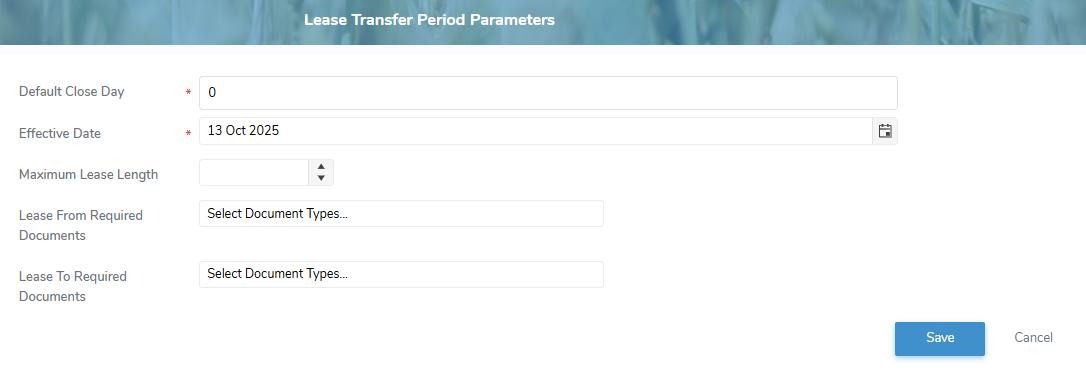
2)Complete the following details:
•Default Close Date*: Type the day of the month the transfer period closes.
•Effective Date: Type the date or click Calendar icon to select the transfer period date becomes effective.
 Note: If the Effective Date is blank the system will try to create a default record. If the default record already exists, the system will prompt the user to enter an Effective Date.
•Maximum Lease Length: Type the maximum number of month(s) for the lease transfer period.
•Lease from Required Documents: Click Select Document Types to choose one or more documents required for transferring a lease from another producer.
•Lease To Required Documents: Click Select Document Types to choose one or more documents required for transferring a lease to another producer.
Note: To see the full list of document types go to Admin > Document Admin > Document Types.
3)Click Save. The lease transfer period parameter display on the Lease Transfer Period Parameters page.
– or –
Click Cancel to return to the Lease Transfer Period Parameters page without saving changes.
Updating a lease transfer period parameter
To edit or update a lease transfer period parameter from the Lease Transfer Period Parameters page:
1)Click Edit icon to open the Update Lease Transfer PeriodParameters page.
2)Edit or update the details of the lease transfer period parameters as necessary (see Adding a new lease transfer period parameter for more information.)
3)Click Save to save the lease transfer period parameters and return to the Lease Transfer Period Parameters page. The details displays on the Lease Transfer Period Parameters page.
Removing a lease transfer period parameter
To remove a lease transfer period parameter from the Lease Transfer Period Parameters page:
1)Click Remove icon of the lease transfer period parameter you want to remove.
2)Click OK to confirm you want to remove this item. The lease transfer period parameter and its detailed information are deleted from the Lease Transfer Period Parameters page.