The Quality Range Maintenance page defines the threshold values used to evaluate milk quality and determine when bonuses or penalties apply. Each range sets limits for lab test results—such as bacteria or somatic cell counts—that indicate whether the milk meets standards, falls into an elevated warning range, or enters a penalty range. These values also drive the colored indicators (yellow for elevated, red for penalty) displayed in related reports and graphs.
 Note: The codes for Range Type are managed in the Manage Settings area under Admin. To add, edit, or remove a range type, go to Code Tables and, select Quality Ranges from the Code Table drop-down arrow (See Code Tables for more information.)
To open the Quality Range Maintenance page from the Dashboard page:
•Click the Quality arrow on the menu bar, select Quality Range Maintenance. Then in the navigation menu select Quality Ranges.
Note: The first page displays all current quality range types and values. Clicking Edit icon opens the details for the specific quality range type (e.g., Butterfat, Lactose, Protein, etc.) Past values cannot be edited, but future sets can be added and updated as needed.
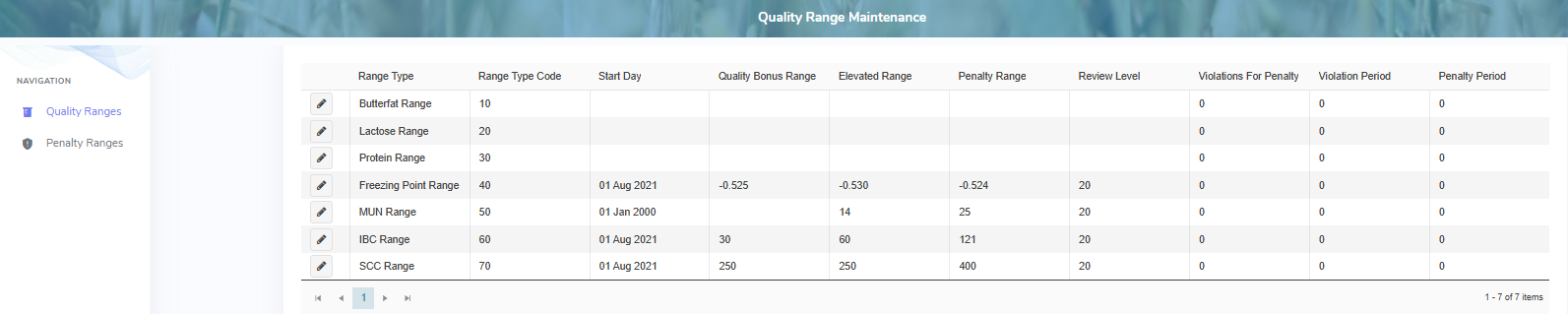
The Quality Range Maintenance page provides:
•View of the range types and its current values
•Ability to add, edit or delete values of a current range type
•Ability to sort column details in ascending or descending order