Adding a new processor board adjustment type
To add a new processor board adjustment type from the Processor Board Adjustment Types page:
1)Click Add New to open the Add New Processor Board Adjustment Type page, and then complete the following: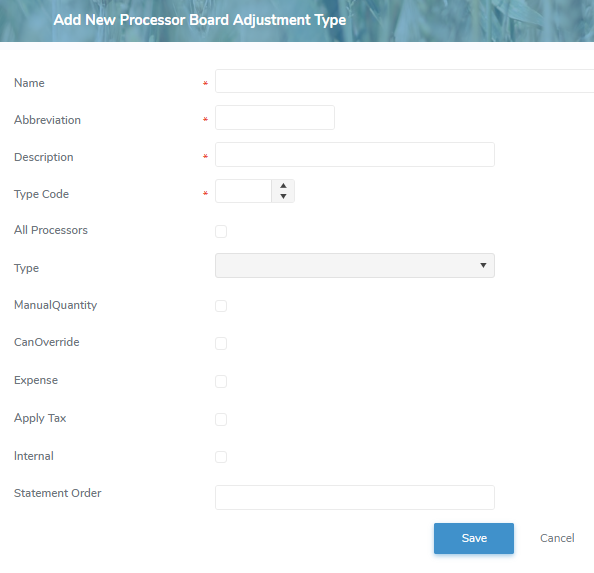
•Name*: Type a name that describes the process board adjustment type.
•Abbreviation*: Type an abbreviation (maximum 15 characters)
•Description*: Type a short description.
•Type Code*: Type a distinct number code.
•All Producers: Select the check box if adding the process board adjustment applies to all producers.
•Type*: Click the arrow and select the type (i.e., Amount, Rate) that applies to the process board adjustment.
If Rate is selected, the Rate field will display.
oRate: Click the arrow and select the rate (i.e., Dollar, Percent) that applies to the process board adjustment.
If Dollar is selected, the Unit field will display.
oUnit: Click the arrow and select the unit (i.e., BFat, Drop Off, HectoLitres, Litres, Loads, LOS, Protein) that applies to the process board adjustment.
•ManualQuantity: Select the check box if a quantity value (e.g., loads) needs to be entered manually.
•CanOverride: Select the check box if a calculated amount can be overrided.
•Expense: Select the check box if the process board adjustment is an expense.
 Note: If expense check box is blank (not selected) then process board adjustment is applied as a revenue.
•Apply Tax: Select the check box if a tax (e.g., GST) applies to the process board adjustment.
•Internal: Select the check box if the month end process of the Milk Payment System automatically calculates, and adds or edits the process board adjustment.
•Statement Order: Type the order number you would like the process board adjustment to display on the processor's statement.
2)Click Save to save the process board adjustment type and return to the Processor Board Adjustment Types page. The process board adjustment type will appear on the list.
– or –
Click Cancel to return to the Processor Board Adjustment Types page without saving the details.
Updating a processor board adjustment type
To edit or update the details of a process board adjustment type from the Processor Board Adjustment Types page:
1)Click Edit icon to open the Update Financial Institution Branch page.
2)Edit or update the details of the process board adjustment type as necessary (see Adding a new financial institution branch for more information.)
3)Click Save to save the process board adjustment type and return to the Processor Board Adjustment Types page. The process board adjustment type will appear on the list.
Removing a processor board adjustment type
To remove a process board adjustment type from the Processor Board Adjustment Types page:
1)Click Remove icon of the process board adjustment type you want to remove.
2)Click OK to confirm you want to remove this type. The process board adjustment type and its detailed information are deleted from the Processor Board Adjustment Types page.