Adding a new processor board adjustment
To add a new processor board adjustment from the Processor Board Adjustment Search page:
1)Click Add New to open the Add New Processor Board Adjustment page.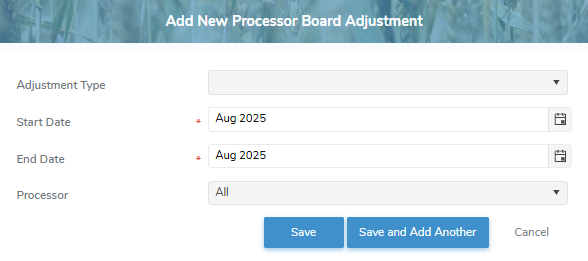
2)Complete the following details:
•Adjustment Type: Type the first character or click the arrow to display list of adjustment types, then use the scroll bar to move up or down to find and select the desired adjustment type.
•Start Date*: Type the date or click Calendar icon to select the start date of the adjustment.
 Note: When updating an adjustment type, the Start Date defaults to the current open production period and may not be editable. It cannot be set earlier than the current period or to one where the same adjustment type already exists. Start dates from previous periods cannot be changed, as those adjustments have already been invoiced.
•End Date*: Type the date or click Calendar icon to select the end date of the adjustment.
•Processor: Type partial or full number of processor, and then use the scroll bar to move up or down to find and select the desired desired processor.
3)Click Save. The processor board adjustment displays on the Processor Board Adjustment Search page.
– or –
Click Save and Add Another to save the processor board adjustment record and open a new adjustment page.
– or –
Click Cancel to return to the Processor Board Adjustment Search page without saving changes.
Updating processor board adjustment
To edit or update a processor board adjustment from the Processor Board Adjustment Search page:
1)Click the Edit icon to open the Update Processor Board Adjustment page.
2)Complete the details of the processor board adjustment as necessary. (See Adding a new processor board adjustment for more information.)
3)Click Save. The processor board adjustment display on the Processor Board Adjustment Search page.
– or –
Click Cancel to return to the Processor Board Adjustment Search page without saving changes.
Removing processor board adjustment
To remove or delete a processor board adjustment from the Processor Board Adjustment Search page:
1)Click the Remove icon of the processor board adjustment you wish to remove.
2)Click OK to confirm you want to delete this item. The processor board adjustment and its detailed information are deleted from the Processor Board Adjustment Search page.
Note: Processor board adjustments can only be removed for current or future month end periods.