To add a new entrant producer from the New Entrant Producers page:
1)Click Add New to open the Add New Entrant page.
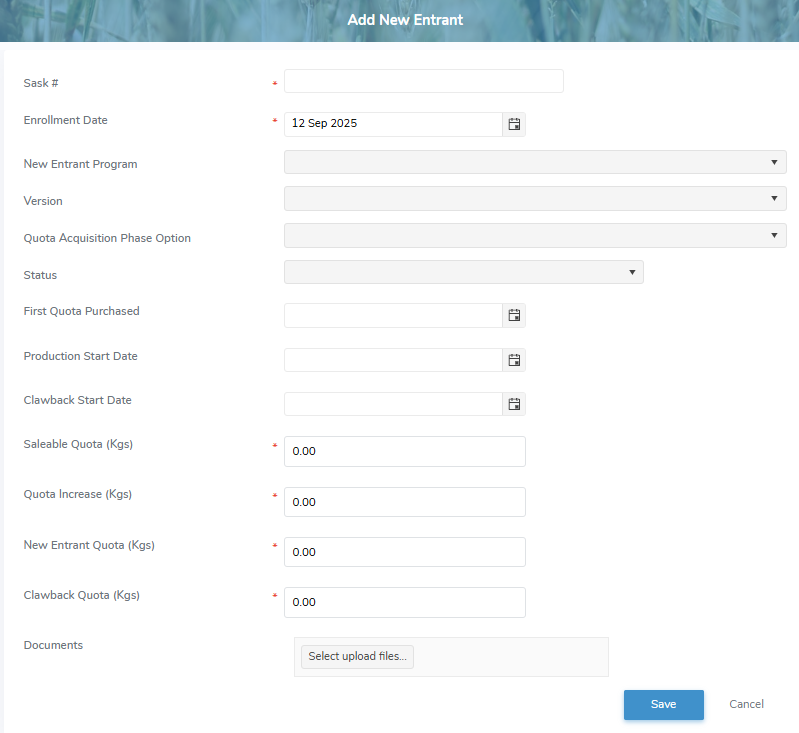
2)Complete the following details:
•Sask #*: Type the SaskMilk registration number assigned to the producer.
•Enrollment Date: Type the start date or click Calendar icon to select enrollment date of the new entrant.
•New Entrant Program: Click the drop-down arrow to display list of programs, and then select the program that applies to the new entrant.
•Version: Click the drop-down arrow to display list of versions, and then select the version that applies to the new entrant.
•Quota Acquisition Phase Option: Click the arrow to display list of options, and then select the quota acquisition phase option that applies to the new entrant.
•Status: Click the drop-down arrow to display the available status options, then select the one that applies to the new entrant.
•First Quota Purchased: Type the date or click Calendar icon to select the date of the first quota purchased.
•Production Start Date: Type the date or click Calendar icon to select the production start date.
•Clawback Start Date: Type the date or click Calendar icon to select the clawback start date.
•Saleable Quota (Kgs)*: Type number of saleable quota in kilograms.
•Quota Increase (Kgs)*: Type number of quota increase in kilograms.
•New Entrant Quota (Kgs)*: Type number of new entrant quota in kilograms.
•Clawback Quota (Kgs)*: Type number of clawback quota in kilograms.
•Documents: Select upload files to select the files you wish to add.
3)Click Save. A message displays you have successfully saved a new entrant.
– or –
Click Cancel to return to the New Entrant Producers page without saving the details.