Miscellaneous Reports are used throughout the dairy year for general inquiries of producer information.
 Note: To see the full list of report types within the SaskMilk Milk Payment System go to Reference Material > Report Types.
To open the Miscellaneous Reports page:
•Click the Reports arrow on the menu bar, and then select Miscellaneous Reports.
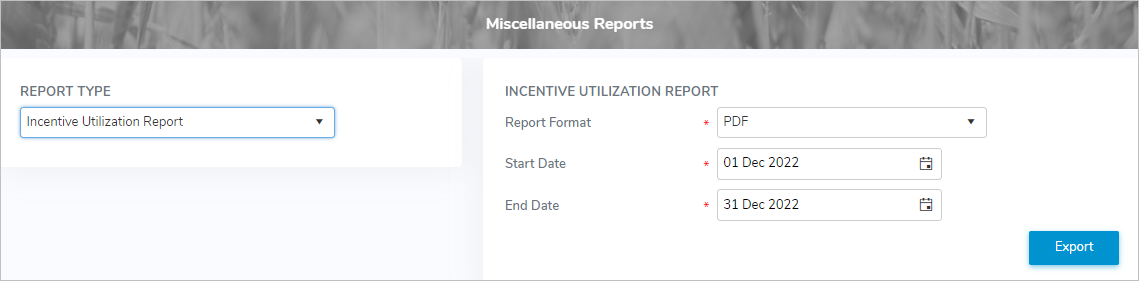
Exporting report output
To export a report from the All Reports page :
Note: The selected report output can be export in various formats including Character Separated Values (CSV), Microsoft Excel (.xlsx), Microsoft Word (.docx), or PDF.
1)Select the report type:
•Report Type: Type the first letter of the report or click the arrow to display the report types, and then select the report type you want to export.
2)Select or type in one or more of the following details:
•Report Format: Click the arrow to display the report formats, and then select the type of format you want to use to export your report.
Other options depending upon the report selected:
•Start Date: Type the start date or click Calendar icon to select the start date you want to retrieve the data.
•End Date: Type the end date or click Calendar icon to select the end date you want to stop retrieving the data.
•Month: Type first letter of the month or click the arrow, and then use the scroll bar to move up or down to find and select the desired month for your report.
•Year: Type the year or click the arrow, and then use the scroll bar to move up or down to select year for your report.
•Plant: Type full the first letter or click the arrow, and then use the scroll bar to move up or down to select the desired plant.
•Percentage Change:Type the percentage threshold to compare a producer’s shipped milk volume and quota against the previous period.
Note: Percentages are used to identify producers whose changes exceed the specified threshold. These producers are included in the report for possible advance payment adjustments.
•Sask #: Type full SaskMilk registered number of the producer.
Note: If the producer registration number is blank. it will create a report of all producers impacted for the report and selected period.
3)Click Export to export the report output list in the format you have selected.
 Tip: By default, most downloaded files open in the Internet browser currently in use, usually in a new window or to your Downloads file on your computer.