The Global Monthly Limit page provides ability to set the positive and negative cumulative position monthly movement limits for an individual producers (overrides global limits).
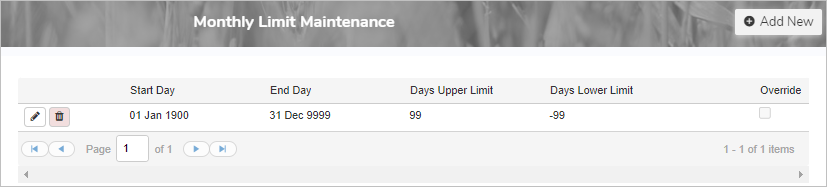
Adding a new global monthly limit
To add a new global monthly limit from the Monthly Limit Maintenance page:
1)Click Add New to open the Add Monthly Limit Maintenance page.
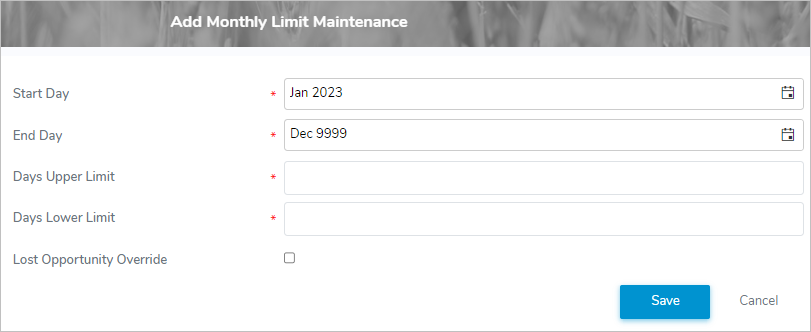
2)Complete the following details:
•Start Day*: Type the date or click the Calendar icon to select the day you would like the global monthly cumulative limit to begin.
 Note: The start date defaults to the current period active month and year.
•End Day*: Type the date or click the Calendar icon to select the day you would like the global monthly cumulative limit to end.
Note: The end date defaults to Dec 9999.
•Days Upper Limit*: Type the maximum number of days a producer's cumulative position can increase in a month.
•Days Lower Limit*: Type the minimum number of days a producer's cumulative position can decrease in a month.
•Lost Opportunity Override: Select the check box if producers do not incur lost opportunity penalties during this monthly limit maintenance period.
3)Click Save. The global monthly limit details display on the Monthly Limit Maintenance page.
– or –
Click Cancel to return to the Monthly Limit Maintenance page without saving changes.
Updating a global monthly limit
To edit or update a global monthly limit from the Monthly Limit Maintenance page:
1)Click the Edit icon to open the Update Monthly Limit Maintenance page.
2)Update the global monthly limit details as needed (see Adding a new global monthly limit for more information of the individual fields).
3)Click Save. The global monthly limit is updated and the details display on the Monthly Limit Maintenance page.
– or –
Click Cancel to return to the Monthly Limit Maintenance page without saving changes.
Removing a global monthly limit
To remove or delete a global monthly limit from the Monthly Limit Maintenance page:
1)Click Remove icon of the global monthly limit you wish to remove.
2)Click OK to confirm you want to delete this item. The global monthly limit and its detailed information are deleted from the Monthly Limit Maintenance page.
Note: You can only delete a global monthly limit if its start date is in the current period or a future period.