 Note: To manage (e.g., add new, edit or remove) credit bulletin board postings, a producer contact must be assigned to Transfer Credit Designation under producer Contacts (see Editing designations for more information.)
Adding a new credit board posting
To add a new credit board posting from the Credit Board page:
1)Click Create Posting to open the Add Credit Posting page.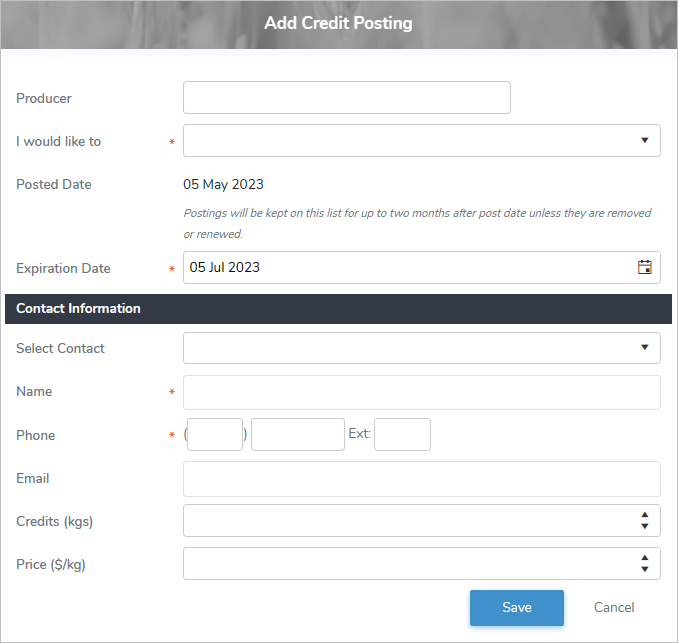
2)Complete the following details:
•Producer: Type partial or full number of producer, and then use the scroll bar to move up or down to find and select the desired producer.
•I would like to*: Click the drop-down arrow to select the type of transfer you wish to create (i.e., Transfer In Credits, Transfer Out Credits).
•Posted Date: Not editable. Defaults to current date.
•Expiration Date*: Type the date or click the Calendar icon to select the date you would like the posting to end.
Note: Credit postings display for up to two months after the Posted Date unless they are removed or renewed.
Contact Information
•Select Contact: Click the drop-down arrow to select the contact name for the credit transfer posting transaction.
•Name*: Type the name of the contact if different from the Selected Contact for the credit transfer posting transaction.
•Phone*: Type the phone number of the contact person.
•Email: Type the email address of the contact person.
•Credits (kgs): Type the total of BFat kilograms for the credit transfer.
•Price ($/kg): Type the dollar amount per kilogram that will be applied to the credit transfer.
3)Click Save to save the posting and return to the Credit Board page.
– or –
Click Cancel to return to the Credit Board page without saving changes.
Note: Producers who subscribes to credit bulletin alerts (see Credit Bulletin Alerts for more information) will receive an email whenever there is a new credit bulletin board posting.
Updating a credit board posting
To edit or update the details of a credit board posting from the Credit Board page:
1)Click Edit icon to open the Update Credit Posting page.
2)Update the details of the credit board posting as needed (see Adding a new credit board posting for more information.)
3)Click Save to save the changes and return to the Credit Board page.
– or –
Click Cancel to return to the Credit Board page without saving the details.
Note: Producers who subscribes to credit bulletin alerts (see Credit Bulletin Alerts for more information) will receive an email whenever there is a new credit bulletin board posting.
Removing a credit board posting
To remove or delete a credit board posting from the Credit Board page:
1)Click Remove icon of the credit board posting you wish to remove.
2)Click OK to confirm you want to delete this item. The credit board posting and its detailed information are deleted from the Credit Board page.