To get started, click the url link (https://portal.saskmilk.ca) to open the SaskMilk Sign in page.
To log in
To log into the Producer Portal:
1)Type your User Name or Producer No and then type your Password.
2)Click Log in to go to the Dashboard page.
To log in with two-step verification
If multi-factor authentication (MFA) is enabled for your account (see Managing security settings for more information) you will complete an additional step when signing in.
1)Enter your username and password. A 2-Step Verification dialog will appear.
2)Select a verification method either email or text message (SMS) based on your security settings for your account.
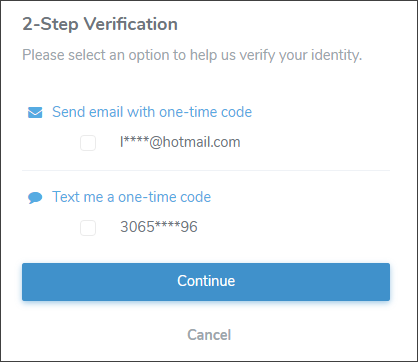
3)Receive your verification code
•Check your email inbox
– or –
•Check your phone for a text message
4)Enter the code in the verification screen.
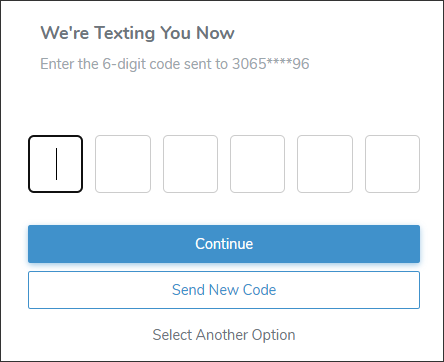
5)Click Continue to proceed.
– or –
Click Send New Code to receive a new code by email or text message.
– or –
Click Select Another Option to a different delivery method.
6)Once verified, you’ll be logged into your account.