Adding a new plant milk class price
To add a new plant milk class price from the Plant Milk Class Prices page:
1)Click Add New to open the Add New Milk Class Price page.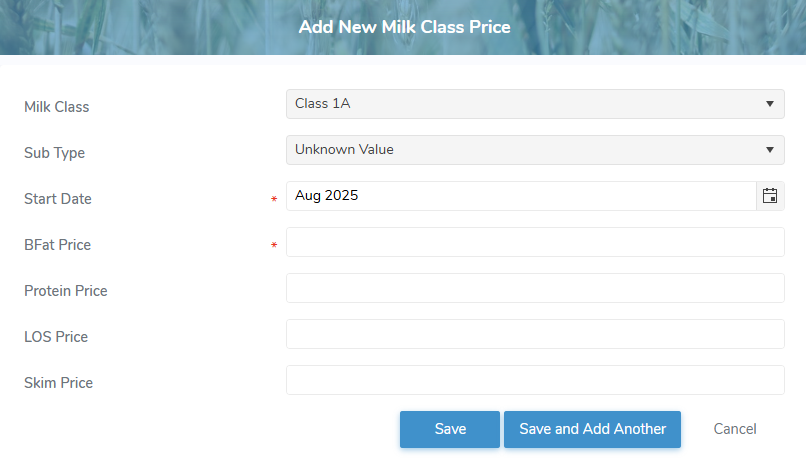
2)Complete the following details:
•Milk Class*: Type first letter of the milk class or click the arrow to display list of milk classes, then use the scroll bar to move up or down to find and select the desired milk class.
•Sub Type*: Type first letter of the sub type or click the arrow to display list of sub type, then use the scroll bar to move up or down to find and select the desired sub type.
•Start Date*: Type the date or click Calendar icon to select the date for the milk class price to start.
•BFat Price*: Type the dollar amount for the milk class sub type BFat price for the period.
•Protein Price: Type the dollar amount for the milk class sub type Protein price for the period.
•LOS Price: Type the dollar amount for the milk class sub type LOS price for the period.
•Skim Price: Type the dollar amount for the milk class sub type skim price for the period.
3)Click Save. The plant milk class price displays on the Plant Milk Class Prices page.
– or –
Click Save and Add Another to save the record and add a plant milk class price.
– or –
Click Cancel to return to the Plant Milk Class Prices page without saving changes.
Updating a plant milk class price
To edit or update a plant milk class price from the Plant Milk Class Prices page:
1)Click Edit icon to open the Update Milk Class Price page.
2)Edit or update the details of the plant milk class price as necessary (see Adding a new plant milk class price for more information.)
3)Click Save to save the plant milk class price and return to the Plant Milk Class Prices page. The plant milk class price displays on the Plant Milk Class Prices page.
– or –
Click Save and Add Another to save the record and add a new plant milk class price.
– or –
Click Cancel to return to the Plant Milk Class Prices page without saving changes.
Removing a plant milk class price
To remove a plant milk class price from the Plant Milk Class Prices page:
1)Click Remove icon of the plant milk class price you want to remove.
2)Click OK to confirm you want to remove this item. The plant milk class price and its detailed information are deleted from the Plant Milk Class Prices page.