Adding new incentive days
To add new incentive days from the Incentive Days Maintenance page:
1)Click Add New to open the Add New Incentive page, and then complete the following: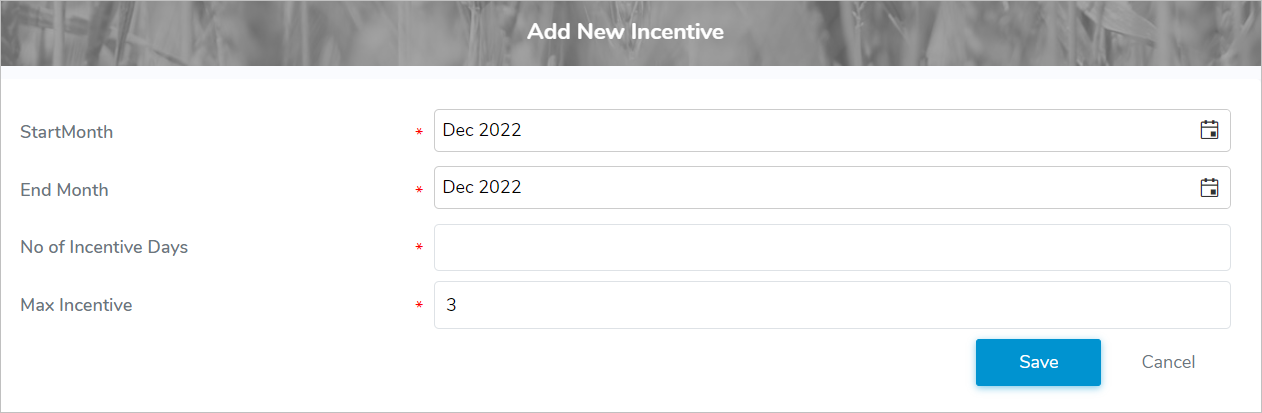
•Start Month*: Type or click Calendar icon to select the month and year of the incentive day period.
•End Month*: Type or click Calendar icon to select the month and year of the incentive day period
•No of Incentive Days*: Type the total number of incentive days which could be used in the period.
•Max Incentive*: Type the maximum number of incentive days that can be applied in a month.
•Exclude Lease: Select the check box if the lease is exclude.
2)Click Save to save the incentive days and return to the Incentive Days Maintenance page. The incentive days display on the Incentive Days Maintenance page.
– or –
Click Cancel to return to the Incentive Days Maintenance page without saving the details.
Updating incentive days
To edit or update incentive days from the Incentive Days Maintenance page:
1)Click Edit icon to open the Update Incentive page.
2)Edit or update the details of the incentive days as necessary (see Adding new incentive days for more information.)
3)Click Save to save the incentive days and return to the Incentive Days Maintenance page. The incentive days display on the Incentive Days Maintenance page.
 Note: Incentive day periods can only be edited if they apply to the current or open periods.
Removing an incentive day
To remove an incentive day from the Incentive Days Maintenance page:
1)Click Remove icon of the incentive days you want to remove.
2)Click OK to confirm you want to remove this incentive. The incentive days and its detailed information are deleted from the Incentive Days Maintenance page.
Note: Incentive day periods can only be removed if they apply to the current or open periods.