Adding a new producer advance override
To add a new producer advance override from the Producer Advance Overrides page:
1)Click Add New to open the Add New Advance Override page.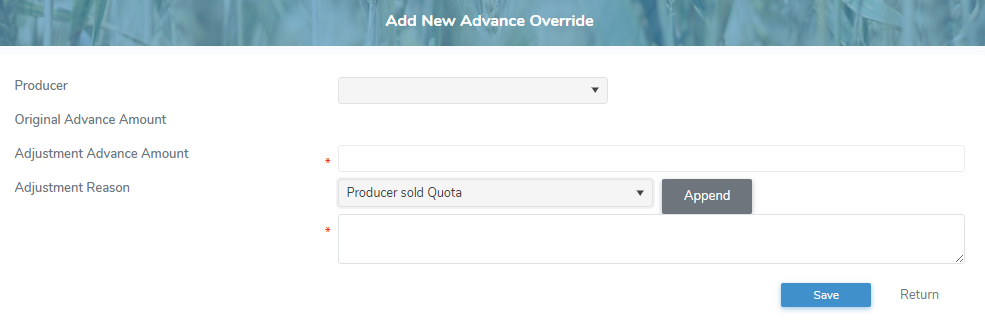
2)Complete the following details:
•Producer: Click the arrow, and then use the scroll bar to move up or down the list to find and select a producer.
•Original Advance Amount: Not editable. Displays the original advance amount based on the previous producer statement, if applicable.
•Adjustment Advance Amount*: Type a dollar amount for the adjusted advance payment.
Note: Use the Adjustment Advance Amount to reflect changes in a producer’s shipping activity for the current period. Enter 0 if they’ve stopped shipping, reduce the amount if production has dropped, or increase it if they’ve purchased more quota or expanded production.
•Adjustment Reason: Click the arrow, and then use the scroll bar to move up or down the list to find and select a reason for the override.
•Adjustment Reason*: Click Append to add the selected reason to the comment field and add any other notes applicable for the override.
3)Click Save. The producer advance override displays on the Producer Advance Overrides page.
– or –
Click Return to return to the Producer Advance Overrides page without saving changes.
Updating a producer advance override
To edit or update a producer advance override from the Producer Advance Overrides page:
1)Click the Edit icon to open the Update Advance Override page.
2)Complete the details of the advance payment rate as necessary. (See Adding a new producer advance override for more information.)
3)Click Save. The advance payment rates display on the Producer Advance Overrides page.
– or –
Click Return to return to the Producer Advance Overrides page without saving changes.
Removing a producer advance override
To remove or delete a producer advance override from the Producer Advance Overrides page:
1)Click the Remove icon of the producer advance override row you wish to remove.
2)Click OK to confirm you want to delete this item. The producer advance override and its detailed information are deleted from the Producer Advance Overrides page.
 Note: Producer advance overrides can only be removed for current month end period.